 |
| Fonts settings in Xubuntu |
Showing posts with label Xubuntu. Show all posts
Showing posts with label Xubuntu. Show all posts
Friday, August 1, 2014
Better font rendering in Xubuntu
Xubuntu is a great distro but I never liked the way it rendered fonts. Through trial and error I've come up with the best font rendering settings for me. Basically, I went to settings ---> Appearance ---->Fonts. Then I change the fonts to Ubuntu + regular + 10. See image for more details.
To fix font rendering in system wide, especially in Firefox, follow the advice in this blog post.

Wednesday, July 23, 2014
Enable hibernation in Xubuntu 14.04
Hibernation is disabled by default in all Ubuntu-based distributions because of problems in some laptops. However, it works fine on my Thinkpad. I do not use hibernation much, but sometimes I want to switch batteries without closing all my applications.
Before enabling hibernation, test that it works on your machine by running the following code.
sudo pm-hibernate
If hibernation works, enable it permanently by opening, with sudo,
/var/lib/polkit-1/localauthority/10-vendor.d/com.ubuntu.desktop.pkla
Then find the two sections below,
[Disable hibernate by default in upower]
[Disable hibernate by default in logind]
Finally, change
“ResultActive=no” to “ResultActive=yes” in both cases.
Restart your computer and you should be able to hibernate your computer from the power menu.
Before enabling hibernation, test that it works on your machine by running the following code.
sudo pm-hibernate
If hibernation works, enable it permanently by opening, with sudo,
/var/lib/polkit-1/localauthority/10-vendor.d/com.ubuntu.desktop.pkla
Then find the two sections below,
[Disable hibernate by default in upower]
[Disable hibernate by default in logind]
Finally, change
“ResultActive=no” to “ResultActive=yes” in both cases.
Restart your computer and you should be able to hibernate your computer from the power menu.
Friday, July 18, 2014
Package management in Xubuntu
Xubuntu ships with the bloated, clunky, slow and ugly Ubuntu Software Center. I always remove this monstrosity from my system and replace it with more sensible options that run great on old machines.
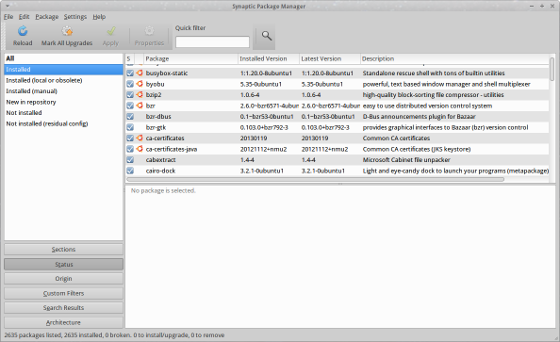
For installing apps in the Ubuntu universe, I install Synaptic Package Manager. This is the old G of package management. I use it for updating, installing and uninstalling applications, adding and removing repositories and other package management tasks.
For installing DEB files downloaded from the internet, I use GDebi. GDebi is a simple application that also fetches dependencies if needs be.
To remove Ubuntu Software Manager
sudo apt-get autoremove software-center
 |
| Software Center |
For installing apps in the Ubuntu universe, I install Synaptic Package Manager. This is the old G of package management. I use it for updating, installing and uninstalling applications, adding and removing repositories and other package management tasks.
 |
| Synaptic Package Manager |
For installing DEB files downloaded from the internet, I use GDebi. GDebi is a simple application that also fetches dependencies if needs be.
 |
| GDebi |
sudo apt-get autoremove software-center
To install Synaptic Package Manager
sudo apt-get install synaptic
sudo apt-get install synaptic
To install GDebi
sudo apt-get install gdebi
sudo apt-get install gdebi
Thursday, July 17, 2014
My New (Old) Thinkpad has arrived
I'm a big Thinkpad fanatic--have always been. Recently, I saw an old IBM T42p on eBay for $80 and immediately purchased it. I thought it was a good deal considering that it originally cost almost 3 grand in 2005. I have a late 2011 15" MacBook Pro that I used for work and when I need lots of computing power, but I love playing around with the Thinkpad for everything else


The laptop has a large and bright 14.1" screen with 1400x1050 resolution. It has a 1.8GHz processor and came with a 1.5 GB of RAM and a 60GB Hitachi HD.
It came with Windows XP SP3 installed and not much else. Since, XP is no longer support I've decided to run Xubuntu 14.04 LTS, which is supported until 2017. I opted for Xubuntu because of its resource friendly and works great on older machines.

This blog serves two purposes:
The laptop has a large and bright 14.1" screen with 1400x1050 resolution. It has a 1.8GHz processor and came with a 1.5 GB of RAM and a 60GB Hitachi HD.
It came with Windows XP SP3 installed and not much else. Since, XP is no longer support I've decided to run Xubuntu 14.04 LTS, which is supported until 2017. I opted for Xubuntu because of its resource friendly and works great on older machines.
This blog serves two purposes:
- A place for me to keep a record of everything I did to the system. This is essential because I know I will break the system in the future because I'm always messing around with configuration files and installing unstable applications from untrusted sources.
- I decided to keep a blog so that others trying to run linux on old Thinkpads can learn from my experience and avoid spending hours in forums looking for solutions to problems that I've already encountered and solved.
Subscribe to:
Posts (Atom)